|
Welcome
Site Features
Common Report Features
Creating Your Report
Premium Billing Reports
> Summary
> Detail
Claims Billing Reports
> Summary Invoice
> Summary by Voucher
> Summary by Group Account
> Detail by Group Number
> Subscribers in Reinsurance
Support
> Group Information
Conclusion
|
Creating Your Report . . .
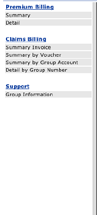
The list of reports available for you to run are presented as the navigation bar in the left panel. Click on any one of the report names to start and
the appropriate input parameters for that report are automatically brought up in the upper section of the Navigation bar.
1. Select your report date range using the
drop down menus.
2. Select the group numbers you want to be included in the
report.
When applicable, you can select a range of group numbers by clicking on the first group number in the range, holding down the Shift key, and then clicking
on the last group number in the range. To select group numbers out of
sequence, hold down the Control key when making your selection.
To select all group numbers, check the Select all Groups option.
On other reports, you would be able to select only one group number from the drop down menu.
3. Where applicable, enter the Group Name that you want to appear in the report title.
4. Click the Submit button to view the report.
5. Click the "Hide Parameters" button to collapse the
parameters view and you will only see the listing of available reports.
|